
Overview
Dyslexia is a neurological difference which affects reading and writing skills, and information processing. Dyslexic people may have difficulty processing and recalling information they see and hear.
There are different types of dyslexia, and different dyslexic people will experience it differently.
For further reading on what dyslexia is, and different definitions, see:
- About dyslexia, British Dyslexia Association
This article includes the Delphi definition of dyslexia, which is a newer definition of dyslexia. - Dyslexia in adults, NHS
- Dyslexia in children, NHS
Accessibility
Some of the things which can help for improving accessibility include:
- Consider alternative ways of presenting information, which reduce reliance on text
E.g. Use of visual / diagrams / graphics to convey meaning - Make screen reader friendly content:
- Use formatted headings in documents – In addition to helping to visually navigate, they help with screen reader navigation.
E.g. in Microsoft Word: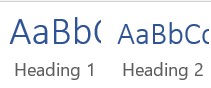
- Ensure images have alt-text included, as these will be used by screen readers
- Consider the potential effects of using emojis – screen readers often read out descriptions in full for each emoji
- Consider how URLs are presented – screen readers reading out long URLs will make documents more difficult to read through
- Use formatted headings in documents – In addition to helping to visually navigate, they help with screen reader navigation.
- Formatting considerations:
- Chunking information into smaller sections, and avoiding large walls of text
- Avoid using justified text – where text is spread evenly between margins, which creates a solid ‘wall’ on both the left and right hand sides
- Font considerations – avoid using:
- Serif fonts
- All upper case text
- Italic text
As well as the recommended resources mentioned on this page, the Accessibility page has guidance on ways to improve accessibility for dyslexic people.
Assistive Technology
Microsoft
Accessibility at Microsoft is the main location to find information on how to make use of accessibility features across Microsoft products. It also includes information on their annual Ability Summit, which is a free in-person and online event which helps raise awareness of accessibility.
Accessibility Fundamentals, available from the Microsoft Learn platform, provides an introduction to disability, accessibility and assistive technology which can help support a variety of disabilities and impairments.
Everway
Everway, formerly Texthelp is often recommended for use in schools, universities and workplaces. They provide a range of tools to support daily tasks like reading, writing, planning and communication.
Recommended Resources and Training
Made by Dyslexia
Website: Made By Dyslexia
Providers of the following training:
- Dyslexia training, in partnership with Made By Dyslexia (Microsoft Learn)
- Empowering Dyslexic Thinking at Work (LinkedIn Learning)
The Made By Dyslexia website has information and resources on how to support Dyslexic people.
British Dyslexia Association (BDA)
Website: British Dyslexia Foundation
The British Dyslexia Association (BDA) is a national charity which provides evidence-informed guidance.
BDA covers education, workplace and everyday support . They have a free helpline, and their website produces widely used guides, checklists and training.
 Step Beyond Awareness